Photoshop for Students. Get super savings at the Adobe Academic Store.
Wacom Tablets and Photoshop - DVD Training (discount price)


Review by Eric Martin
[Best price from Amazon.com at $228.99] See the full the line of Wacom tablets at Amazon.com (offered at the best price). Also see Wacom tablet pens, tablet accessories, and the most popular tablets.
Wacom Intuos4 Pen Tablets Overview - Intuos 4 New Features
Here are more details on the new features of the Wacom Intuos4 Pen Tablets that have just been released .
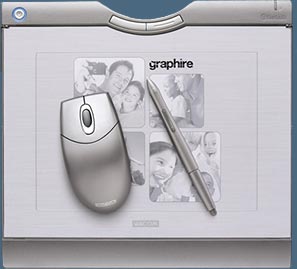 The new Wacom Graphire Bluetooth pen tablet features a cordless, battery-free, pressure-sensitive pen with a built-in eraser, and a battery-free cordless mouse with a scroll wheel.
The Tablet has a rechargeable lithium polymer battery that lasts for 25 hours, and comes with a universal power adapter (it accepts 110 and 220 volts). Recharge time is 5 to 6 hours, and a long 12-foot cable makes using the tablet while the battery is charging very convenient.
The wireless Graphire has a nice large 6" x 8" active area, which is a real pleasure, as smaller tablets tend to be a little awkward to use.
Setting everything up was simple and easy. Once you've installed the driver software you'll find a new pane in your preferences window. From there you can change a variety of settings, including Eraser Feel (soft to firm), Double Click Distance (small to big), Mouse Mode Tracking (acceleration and speed), Pen Mode Tracking (screen area, scaling, and tablet area) and Tip Feel (soft to firm).
Connecting To A Bluetooth-enabled Computer
There are simple instructions to make the tablet discoverable and to have it paired with your computer. Once you've done that the pen tablet will appear as a connected device in the Bluetooth devices control panel.
Part of the Wacom pen's innovative magic is something called "absolute positioning". To mimic the versatility of an actual pen, Wacom has designed their software so that the position of your screen cursor corresponds closely to how you move the pen tip. This means that you don't need to drag your pen across the tablet from one location to another - you can just lift it and touch down elsewhere, and the screen cursor will follow.
This contrasts with the Graphire wireless mouse, which uses the relative positioning we're all familiar with to slide the screen cursor from one place to another. The Wacom software gives you the option of using either method for the pen, but it is suggested that you leave it in absolute positioning, which makes the pen much easier to control.
On the installation CD there's a "Pen Basics" tutorial that uses animated illustrations to help explain absolute positioning, and watching it will make transitioning to this new mode easier for a beginner to understand.
Taking It For A Drive
 The Graphire pen is pressure-sensitive, which means you can control the amount of a Photoshop effect by changing how hard you press the pen tip to the tablet.
The graphic on the right was my first attempt at pressure-sensitive work. With one pass of the pen I started with very little pressure, then increased it in varying degrees, and ended the squiggle with maximum pressure applied. Watching this happen on the screen is really amazing as you see the Photoshop brush responding to your touch. Photoshop has more than 20 customizable tools that will perform better by using a pen tablet.
You can flip the pen around and use the built-in eraser to fix mistakes. Another nice feature on this tablet is a picture frame, which is a cover on the tablet that you can insert paper beneath to hold it in place. This comes in handy if you want to trace some previous artwork.
As far as the Bluetooth technology was concerned, it worked flawlessly, and I found myself drawing on the tablet at a good 6 feet from the screen, giving me a nice perspective on my canvas area.
The Graphire Wireless Tablet will also be a very useful tool for conducting workshops and seminars. Instructors will be able to wander up to 30 feet from their computers while still controlling Photoshop from the tablet in their hands.
Summary - Welcome To The Wireless Studio
I think anyone who is using Photoshop on a professional level will benefit from having a pen tablet, and having one that operates wirelessly is a huge bonus. I also found the color of this tablet — a darkish silvery gray — very appealing.
The software is easy to install, the help files cover all the bases, and the various settings perform as advertised. Some things just look good, feel right, and work well. The Graphire Bluetooth falls into that category. My advice is simple — get one.
[Best price from Amazon.com at $228.99] See the full the line of Wacom tablets at Amazon.com (offered at the best price). Also see Wacom tablet pens, tablet accessories, and most popular tablets.
Photoshop CS4 & Photoshop CS4 Extended - Best Deals From Adobe
 Photoshop CS4 and Photoshop CS4 Extended feature a newly refined, tab-based interface in a single, integrated window, with self-adjusting panels arranged in docked groups. Automatically keeping tools well organized and away from your work area means you get greater efficiency, less clutter, and better results, faster than before.
Delivering all the features of Adobe Photoshop CS4 software, including the new Adjustments and Masks panels, Adobe Photoshop CS4 Extended also provides breakthrough 3D editing and compositing power to paint directly on 3D models, create 3D animations, convert 2D images to 3D objects, and more; richer motion graphics editing; and more powerful and flexible image analysis and tracking. Learn more on our Photoshop CS4 Tutorials Page. To download the free trial, see details on our Photoshop CS4 Free Trial Download Page.
Find upgrade options and package deals at the Adobe USA Store. Teachers and students get special pricing at the Adobe Education Store. You can also buy in your country currency and language at the following Adobe International Stores:
Adobe United Kingdom | Adobe Germany | Adobe France | Adobe Eastern Europe
Adobe Creative Suite 4 Design Premium - Complete CS4 Bundle
 Adobe Creative Suite 4 Design Premium software is the designer's dream toolkit for print, web, and mobile publishing. Creativity is rarely confined to one medium, so put your vector illustrations in motion, moving fluidly between Adobe Illustrator CS4 and Adobe Flash CS4 Professional. And use Adobe Photoshop CS4 Extended to design and slice a web page for publishing with Adobe Dreamweaver CS4.
Adobe Creative Suite 4 Design Premium combines essential tools for producing everything from professional page layouts to rich interactive experiences in a unified, intuitive environment. Also includes Adobe Acrobat 9 Pro, Adobe InDesign CS4, plus Adobe Fireworks CS4.
Buy now or download the free trial at the Adobe USA Store, or buy in your country currency and language at the following Adobe International Stores:
Adobe United Kingdom | Adobe Germany | Adobe France | Adobe Eastern Europe
Specifications & Features
Tablet Dimensions: 10.13" x 11.03" x .96"
Active Area: 5.94" x 8.22"
Pressure Levels: 512
Price: $249.95
One Year Warranty
System Requirements: PC or Macintosh computer running Windows 2000, XP, or Mac OS 10.2.8 & higher with Bluetooth 1.1 (or higher) connection, CD-ROM drive, and color monitor.
Graphire Wireless Tablet
Features two programmable ExpressKeys for convenient mouse clicks, modifier keys, and keyboard shortcuts.
Transparent photo frame for easy personalization with photos and artwork (samples and template are included).
Integrated pen compartment and a separate pen stand.
Graphire Pen With Eraser
512 levels of pressure-sensitivity for natural brush control.
Patented cordless, battery-free technology for a natural feel and superior performance.
Programmable DuoSwitch for multi-button efficiency right at your fingertips.
Pressure-sensitive eraser for easy fixes.
Graphire Cordless Mouse
Patented cordless, battery-free technology.
Scrolling finger wheel for easy navigation — also functions as a third programmable button.
Battery & Adapter
Rechargeable Lithium Polymer tablet battery for up to 25 hours between charges.
Universal power adapter permits simultaneous tablet charging and comfortable use.
Bundled Free Software
Adobe Photoshop Elements 2 for editing family photos.
Painter Essentials 2 by Corel for creating natural media art.
Color Efex Pro 2 GE from nik multimedia for selectively applying photo enhancements.
[Best price from Amazon.com at $228.99] See the full the line of Wacom tablets at Amazon.com (offered at the best price). Also see Wacom tablet pens, tablet accessories, and most popular tablets.